


Shaver series 7000
Shaving unit
- Discontinued
- Buy SH71 instead

Reset your shaver after replacing shaving heads
After replacing shaving heads, you can reset the replacement reminder by pressing the on/off button for more than 7 seconds. Otherwise, replacement trigger will turn off automatically after 9 successive shaves.

Replace your shaving heads in just two steps
The latest Philips shavers have an inbuilt replacement reminder in the form of a shaving unit symbol. This symbol will light up and indicate you when to replace shaving heads.

The easiest way to keep your shaver at best
The upgraded solution makes the maintenance of your Philips Shaver easier than ever. This new format will allow you to install the new shaving heads in just two steps, facilitating thorough cleaning of the shaver and optimizing your daily shave.

A facial shaver for a close yet sensitive shave
The electric shaver for sensitive skin is equipped with GentlePrecision Blades to minimise tugs, pulls or repetitive passes on your skin. Even when used on 3-day stubble.

Replacement reminder
1. Pull the shaving head off. 2. Replace the shavings head with a new one. 3. To reset the shaver, press and hold the on/off button for more than 5 seconds.
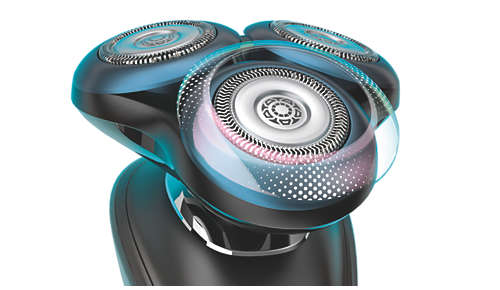
SkinGlide Rings with microspheres for a smoother glide
Experience the smooth glide of Philips advanced microsphere technology. Inspired by gliding principles in aerodynamics, the shaver rings are coated with thousands of tiny, glass-like spheres for maximum skin comfort.
| Fits product type |
Shaver series 7000 (S79xx) Sensotouch 3D (RQ10xx)(RQ12xx) |
| Upgraded shaving heads | SH70 has been replaced by SH71 |
| Important | SH71 is not compatible with SensoTouch (RQ12xx) or Arcitec shavers (RQ10xx). |
| Included in pack | A complete Shaving Unit |

